Look first
- Click the round button at the top right and choose Settings, then Your data. Remove what Harry added is at the bottom.
- Press See what Harry would remove. Going through your HubSpot can take a minute.
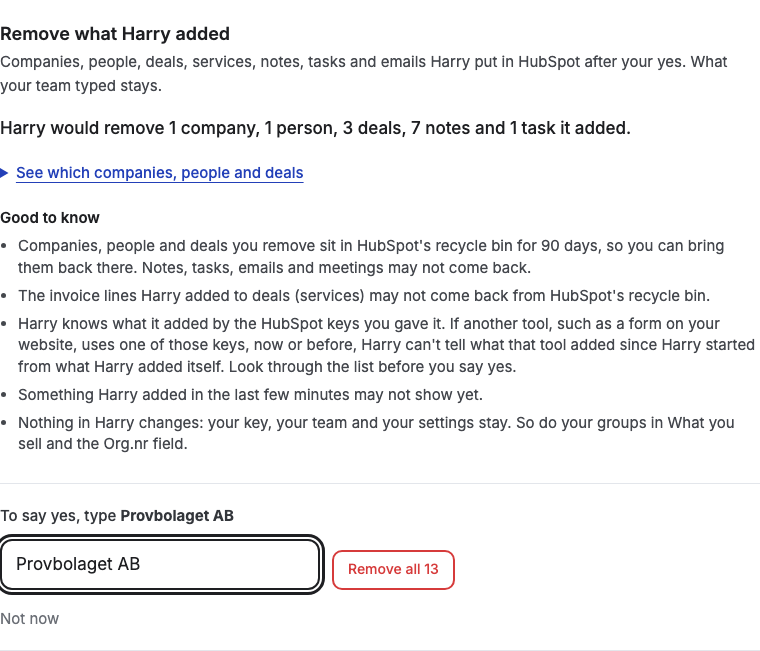
Harry then tells you what it would remove, for example “Harry would remove 3 companies, 5 people and 2 sales it added.” Open See which companies, people and sales to check them by name, with a link to each in HubSpot. Harry names up to 200. If there are more, it says how many more, and those are removed too, so look them over in HubSpot before you say yes.
What stays
Under Harry leaves 2 things alone (with your own number), Harry lists what it added but won’t touch, and why:
- It’s marked done.
- Someone changed it in HubSpot.
- Something on it stays in HubSpot.
- HubSpot didn’t answer for it just now.
Nothing in Harry changes either. Your HubSpot connection, your team and your settings stay, and so do your groups in What you sell and the Org.nr field.
Say yes
Under To say yes, type, type the name Harry shows. Then press Remove all with the number (or Remove it when there is only one). Keep the page open while Harry works. Press Not now if you’d rather not.
Harry checks HubSpot again before it removes anything. When it is done it says what it removed. If there was more than it could look at in one go, press Look at the next ones.
If Harry stops part way, it tells you what went and what is still in HubSpot. Press Look again to carry on.
Good to know
- Companies, people and sales you remove sit in HubSpot’s recycle bin for 90 days, so you can bring them back there. Notes, tasks, emails and meetings may not come back.
- The invoice lines Harry added to sales (services) may not come back from HubSpot’s recycle bin.
- Harry knows what it added by the connection or the HubSpot keys you gave it. If another tool, such as a form on your website, uses one of those keys, Harry can’t tell what that tool added. Look through the list before you say yes.
- Something Harry added in the last few minutes may not show yet.