The list ends with one short line saying where its facts come from, and a link to the part of this page that says more.
Shortlist
When Harry has turned it on for your workspace, the tab opens with a Shortlist: up to five companies or people worth contacting today. Each one says why now and links to where Harry saw it, so you can check it yourself. One Harry can’t link to doesn’t go on the list. The coming days are folded under Coming days.
Harry builds the list once every weekday morning. On a weekend, Build Monday’s list makes Monday’s list early; Harry then keeps it for Monday. While it builds, a bar shows which place Harry is reading and which ones are done. That can take a few minutes. It builds from these places:
- Your customers who are hiring, from their job ads on Platsbanken. Only an ad for a job that may need what you sell counts (see below).
- What your customers posted on LinkedIn: a post that says they are hiring, opening somewhere, starting work or have won work. Harry reads up to three customers’ pages a day, each about once a week, and only for customers with a website in your HubSpot. The row quotes the post and links to it.
- Companies like your best customers that are hiring. Harry checks the closest ones in SCB’s company register for job ads on Platsbanken, and only one with an ad goes on the list. The rest are still further down this page.
Which job ads count
A big company posts ads for all kinds of jobs, and most of them have nothing to do with you. So Harry asks AI at Cloudflare, once each morning, which ads are for a job that may need what you sell. It sends only each ad’s headline, the facts under What you sell in Your company (the ones you said Right to, or Harry’s guesses while there are none), and the headlines of ads you said Not this reason to before. Harry adds no company name, org-nr or anything from your HubSpot, though a headline can name the company that posted the ad. The row then names the ads that fit and links to one of them.
With nothing under What you sell, Harry leaves job ads out of the list. If the AI doesn’t answer one morning, that day’s list has no job ads. When that leaves nothing at all, there is no list that morning, and Build today’s list tries again.
A company from the register that matches something under Not a customer in Your company is left out once you’ve said Right to it. While it’s still Harry’s guess, the company just counts for less.
Fixed rules put them in order: a fresh reason beats an old one, and someone in your HubSpot to ask for by name beats a company with nobody yet. Nobody comes back within 60 days unless something new happened. A day with fewer than five good ones shows fewer. Apart from the check on job ads, no AI picks or words anything here.
For a customer, the row shows the person HubSpot links to that company, when there is exactly one.
Looking up people
Looking up people is off for every workspace. When it’s on, the list does two more things:
- A contact who moved. Each weekday Harry checks one of the contacts at your customers, each about once in two months. If they moved to another company in the last half year, their new company is on the list with them on it. Their address in HubSpot is from the company they left, so Harry leaves it out. Yes makes a task to call them, on them and on the company HubSpot has them at.
- Someone to ask for. For up to two companies on today’s list with nobody in your HubSpot, Harry looks for the person with the job title under Who decides (or VD when you haven’t said). It shows their name, job title and a link to their LinkedIn profile. It shows an email address only when a check says the address takes mail, and it never guesses one. Harry keeps that person on the row only until the list’s day is over.
The lookups cost Harry money, so each morning’s list has a budget of 20 US cents, which counts toward your workspace’s daily limit for lookups. When the budget runs out, the list is shorter that day.
Each of today’s rows has Yes and No:
- Yes asks Harry to get it ready for your HubSpot. For a company from the register, that is the company with its org-nr and town, the same as Add to my HubSpot further down. For one of your customers, it is a task to call them, due on the list’s day, with why now and where Harry saw it. A card then shows exactly what Harry will add, and nothing goes in until you press Yes, add it there. Cancel puts the row back.
- No asks why, on the row:
- Not this company takes the company off your list for half a year, whatever happens there meanwhile. A “no” is usually “not now”, so it doesn’t last forever.
- Not this reason keeps only that reason off for that company, for a month. Another reason, like a post, can bring it back. On a row about job ads, Harry keeps the ads’ headlines and tells the AI next time that jobs like these don’t need what you sell.
Harry never adds people or email addresses it found to your HubSpot, and it never contacts anyone.
When Harry has put the list in the morning email for your workspace, the email ends with today’s rows. Yes or no in Harry in the email opens this tab, where you answer. Nothing is answered by clicking in the email.
Only the people in your workspace can see the list. Once a day has passed, Harry keeps only who it showed you that day, for 60 days, so it knows not to show them again. Your Yes and No answers are kept for 180 days, with the headlines of the job ads a Not this reason was about. Connecting another HubSpot account clears the list and your Yes answers; a No on a company with an org-nr stays.
Your company
Under the shortlist, Your company is what Harry knows about what you sell and who buys from you. The shortlist uses What you sell to judge job ads, Not a customer to leave companies out, and Who decides for the job title it looks for.
Type your website and press Read my website. Harry reads whichever site you type, so type your own. It reads the home page and up to four more pages whose address says what you do, like your services, your customers or “om oss”. It skips pages about your staff, jobs, news and cookies. Then AI picks out short facts under these headings:
- What you sell
- Who buys: their line of business and their size
- Where your buyers are
- Who decides: the job title of the person who buys from you
- Not a customer: who you say you don’t work with
Each fact shows the page it came from and the words on that page that say it, with the day Harry read it. Harry keeps a fact only when those words really are on that page and say it, so AI can’t make one up. Harry leaves out a fact whose words hold an email address, a web address, a phone number or what looks like a person’s name, and a job title that reads like a name.
If you also type your org-nr, Harry looks your company up in SCB’s company register and adds what it says about you under About you: your line of business, your county and how many people work there. Leave it empty and Harry skips this. A sole trader’s number is never sent.
Facts Harry found are marked Guess until someone in your workspace says Right. Change puts your words in place of Harry’s, and Remove takes a fact away. You can also add a fact yourself at the bottom. Your word always wins: when you read your website again later, Harry replaces only its own guesses, never a fact you confirmed, changed or removed, and it doesn’t suggest a removed fact again.
What leaves Harry
Nothing is read until you press the button. Harry sends your website’s address to treg, which fetches the site’s list of pages and the text of the pages Harry picks. Only those pages’ text goes to AI, which runs at Cloudflare. No invoice, mail or anything from your HubSpot goes with it. One reading costs Harry about a cent, and counts toward your workspace’s daily limit for lookups and for AI. You can read your website up to five times an hour, and your workspace up to ten times a day.
Harry keeps the facts, the page and words each came from, and who in your workspace changed it, until you change them or the workspace is reset or deleted. The pages themselves are not kept. Nothing here is written to your HubSpot.
What your best customers have in common
Harry starts from the customers you invoiced most. The list below looks for companies like them.
Companies like your best customers
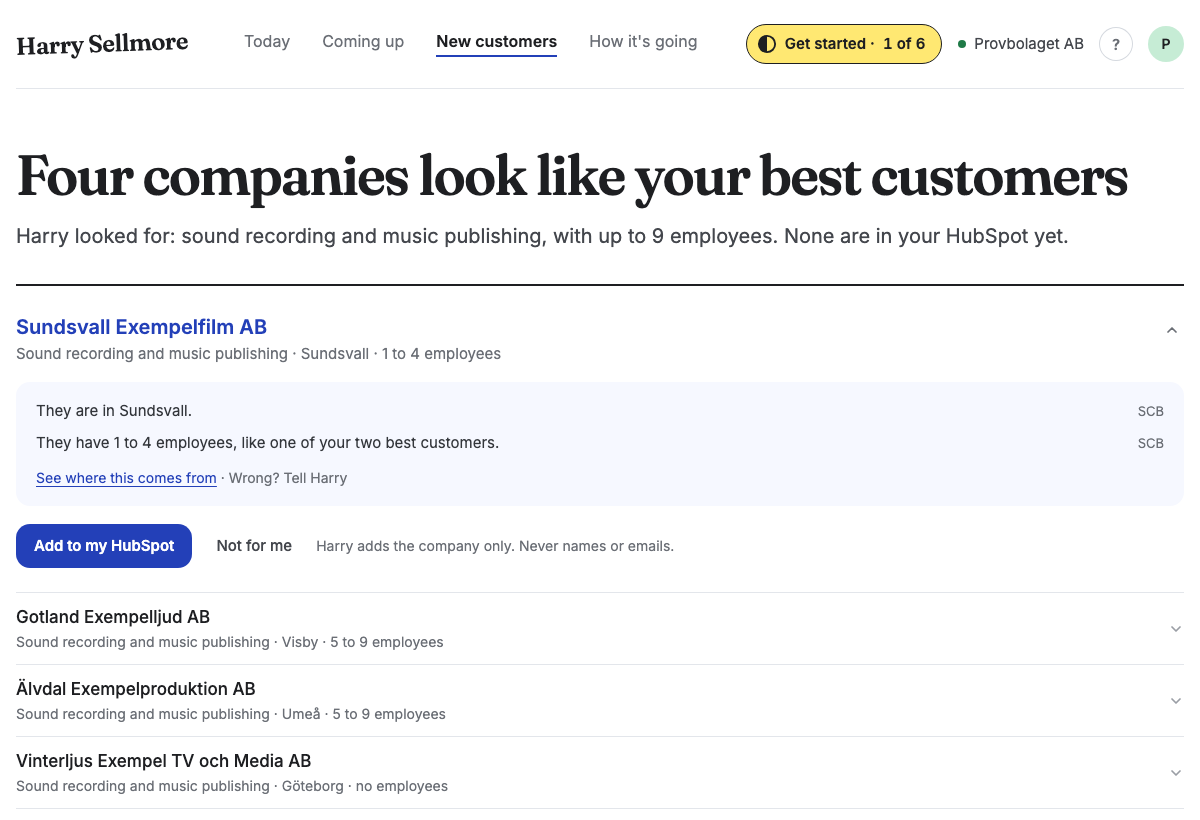
The list is companies in Sweden that look like your best customers and aren’t in your HubSpot yet. It looks your best customers up in SCB’s company register (Statistics Sweden), sees which line of business most of them are in and how many people they have, and then asks the register for companies like that. If most of your best customers are in one county, it looks there only. Then it keeps the companies about their size.
The line under the headline says what Harry looked for, like “Harry looked for: sound recording and music publishing, with up to 9 employees, in Stockholm.” Every company in the list matches it, so Harry says it once there.
The closest come first: companies the size your best customers most often are, then companies in a municipality where one of your best customers is. Among equals the order stays the same from day to day. Harry never orders them by name.
One company is open at a time. Its grey line says what it does, where it is and how many people work there. Under that, Harry says where it is and how its size compares with your best customers. When Harry knows nothing more about a company, it says the line of business it shares with your best customers. Each line says which register it comes from. Click another company to open it, or Show all to see the whole list. When there are more companies than Harry shows, the line under the list says how many of the closest it shows.
Some names are in capital letters in the register. Harry shows them in ordinary letters, like “Exempel Ljud AB”, but keeps AB, HB and other short abbreviations as they are.
Harry leaves some companies out:
- Sole traders. Their org-nr is the owner’s personal identity number.
- Companies that asked not to get advertising. The register marks them, and Harry respects it.
- Companies registered abroad. The register lists some, but this list is about companies in Sweden.
- Companies that are no longer active, and companies already in your HubSpot, by org-nr or by name.
Harry picks and orders the companies with fixed rules. No AI decides anything here.
Add to my HubSpot
Press Add to my HubSpot, and Harry shows what it would add: the company, its org-nr and its town. The name goes in exactly as the register spells it, capitals and all. Nothing goes in until you press Yes, add it. Then the card says Added to your HubSpot, with Open in HubSpot to see it there. Harry never adds people or email addresses, because it would have to guess them. The card also quotes the note Harry puts on the company in HubSpot, saying it added it, and when, from Sweden’s company register.
If the company turns out to be in your HubSpot already, Harry leaves it as it is.
Not for me
Press Not for me and Harry stops suggesting that company for a year. If something about a company looks wrong, press Wrong? Tell Harry. Harry leaves that company out too.
What leaves Harry
To find companies like your customers, Harry sends SCB the org-nrs of your biggest customers that are companies, and the line of business and county it is looking for. Harry keeps the answers for at most a day, and never in its own database. It asks SCB a limited number of times a day for each workspace, so if you open the page very often, the list may wait until the next day.
A sole trader’s number never goes to SCB. Nothing is written to your HubSpot from this tab unless you say yes to a company.
If the tab says Harry isn’t connected to a company register yet, there is nothing for you to do. It starts working once we have connected Harry to the register.
News about the customers you already have, like who is hiring, is on Today.
NextHow it's going